A safety meeting sign-in sheet is a documented record that captures the date, topic, presenter and names of every worker who attended a safety training session or toolbox talk. OSHA requires employers to maintain records of safety training and a signed attendance sheet is the most straightforward way to prove that training happened and that specific employees participated. Without this documentation, you have no evidence of compliance - even if the training actually took place.
When an OSHA inspector investigates an incident, one of the first documents they request is proof that the injured worker received training relevant to the task. If you cannot produce a sign-in sheet with that worker's signature, the inspector may conclude that training was never provided. The result is a citation, a higher penalty and a weaker legal position if litigation follows.
What to Include on a Safety Meeting Sign-In Sheet
An effective toolbox talk attendance sheet captures more than just names. Include the following fields to create a record that will hold up during an audit or legal proceeding:
Free Download: 5 Safe Work Procedures
Choose from 112 professionally written SWPs. No credit card required.
Get Free SWPs- Date and time - Record when the meeting started. If you conduct multiple sessions on the same topic (different shifts, for example), each session needs its own sheet.
- Meeting topic - Be specific. "Safety" is not a topic. "Fall protection requirements for roof work on Building C" is a topic.
- Presenter name and title - Document who delivered the training and their qualification to do so.
- Location - Note the job site, building or conference room.
- Duration - How long did the session last? This matters for training that requires a minimum number of hours.
- Attendee printed name - Printed legibly, not just a signature scrawl.
- Attendee signature - A handwritten signature or digital equivalent confirming attendance.
- Employee ID or company - Useful on multi-employer job sites where contractors attend the same meeting.
- Key discussion points or summary - A brief outline of what was covered. This proves the content of the training, not just the fact that people gathered in a room.
OSHA Training Documentation Requirements
OSHA does not mandate a specific form for safety training sign-in sheets. However, numerous OSHA standards require employers to document that training was provided. Examples include:
- Hazard Communication (1910.1200) - Training on chemical hazards and Safety Data Sheets
- Lockout/Tagout (1910.147) - Training for authorized and affected employees
- Fall Protection (1926.503) - Training for employees exposed to fall hazards
- Confined Space (1910.146) - Training for entrants, attendants and supervisors
- Respiratory Protection (1910.134) - Training on respirator use, limitations and maintenance
- Powered Industrial Trucks (1910.178) - Operator certification and refresher training
For each of these standards, the burden of proof falls on the employer. A safety training sign-in sheet paired with the training content (slides, handouts or agenda) creates a defensible record.
For tips on structuring your meetings for maximum impact, read our guide on building an effective safety meeting agenda.
Common Mistakes with Safety Meeting Sign-In Sheets
Even companies that consistently hold safety meetings make documentation errors that undermine their records:
Missing Dates or Topics
A sign-in sheet without a date is nearly useless. A sheet with names and signatures but no topic documented cannot prove what training was delivered. Always fill in the header information before passing the sheet around.
Illegible Signatures
If a name cannot be read, it cannot be verified. Require attendees to print their name clearly in addition to signing. On multi-employer sites, also require the company name.
Signing for Absent Workers
This is falsification of records and creates massive legal exposure. If a worker was not present for the training, they cannot be listed as an attendee. They must attend a makeup session and sign a separate record.
No Content Summary
A sign-in sheet proves attendance. A content summary proves what was taught. Without both, an attorney or inspector can argue that the meeting was a formality rather than substantive training. Even a short bulleted list of key points adds significant evidentiary weight.
Poor Storage and Retrieval
Paper sign-in sheets shoved into a drawer or binder are difficult to locate months or years later. They also degrade, get coffee-stained and sometimes vanish entirely. OSHA training records should be retained for at least the duration of employment and many standards require specific retention periods.
How Long to Keep Safety Training Records
Retention requirements vary by standard. Some examples:
- Hazard Communication - Duration of employment
- Bloodborne Pathogens - Duration of employment plus 30 years
- Respiratory Protection - Until replaced with a current record
- Hearing Conservation - Duration of employment
- General safety training - No specific OSHA requirement, but best practice is a minimum of five years
When in doubt, keep records longer than you think necessary. Storage is cheap. Recreating lost records is impossible.
Digital Sign-In vs. Paper: Making the Switch
Paper sign-in sheets have been the default for decades, but digital alternatives are overtaking them for good reasons:
Accuracy. Digital forms eliminate illegible handwriting. Workers type or select their name from a roster and the system timestamps their entry automatically.
Accessibility. Need to pull up every toolbox talk a specific worker attended in the last two years? A digital system returns results in seconds. With paper, that is a manual search through dozens of binders.
Accountability. Digital platforms can send reminders when training is overdue, flag workers who have not attended required sessions and generate compliance reports for management review.
Security. Paper gets lost, damaged or altered. Digital records with audit trails are tamper-evident and backed up automatically.
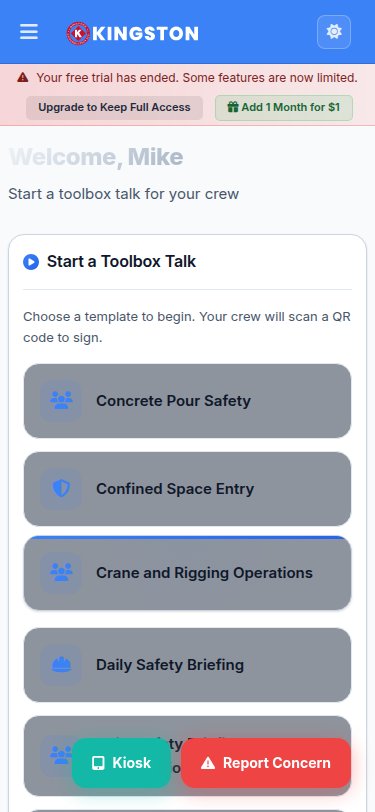
Make Safety Easy's toolbox talk feature combines meeting content delivery with built-in attendance tracking. You select or create a topic, present it to your crew and capture digital sign-ins on the same platform. Every record is stored, searchable and exportable for audits.
Building a Toolbox Talk Attendance Program
A sign-in sheet is one piece of a larger training documentation system. Here is how to build a program that keeps you compliant and audit-ready:
Step 1: Create a Training Calendar
Map out required training topics for the year. Include regulatory requirements (annual refreshers, initial training for new hires) and site-specific topics driven by your hazard assessment and incident history.
Step 2: Standardize Your Sign-In Process
Use the same form or digital tool for every meeting. Consistency makes it easy for presenters and easy for auditors. Train your supervisors on how to complete the form correctly.
Step 3: Assign Ownership
Designate someone - a safety coordinator, an office administrator or a site supervisor - to collect, review and file completed sign-in sheets within 24 hours of each meeting.
Step 4: Audit Your Own Records
Quarterly, pull a sample of sign-in sheets and verify they are complete. Check that every required employee appears on the attendance list for mandatory training topics. Identify gaps before an inspector does.
Step 5: Link Training Records to Employee Files
Each worker should have a training matrix that shows every session they have attended. This matrix is the fastest way to verify compliance for any individual employee. Digital systems build this automatically.
Frequently Asked Questions
Can I use an electronic signature for safety meeting sign-in?
Yes. OSHA has accepted electronic signatures as valid documentation. The key is that the signature must be attributable to the specific individual and the system must prevent unauthorized changes after signing.
Do I need a separate sign-in sheet for each toolbox talk?
Yes. Each meeting or training session should have its own documented record with its own date, topic and attendee list. Combining multiple meetings onto one sheet creates confusion during audits.
What if an employee refuses to sign?
Document the refusal. Note the employee's name, the date and the fact that they attended but declined to sign. Have a witness (the presenter or supervisor) countersign this note. Address the refusal through your company's disciplinary process.
Stop Losing Training Records
Every unsigned sheet and every lost binder is a compliance gap waiting to be discovered. Make Safety Easy digitizes your entire toolbox talk and safety meeting workflow - from topic selection to attendance capture to long-term record storage. Request a demo to see how simple compliant training documentation can be, or explore pricing options for your team size.
Ready to simplify your safety program?
Make Safety Easy helps teams run toolbox talks, inspections, incident reports and more - all from one platform.
Start Your Free TrialNo credit card required. 14-day free trial.