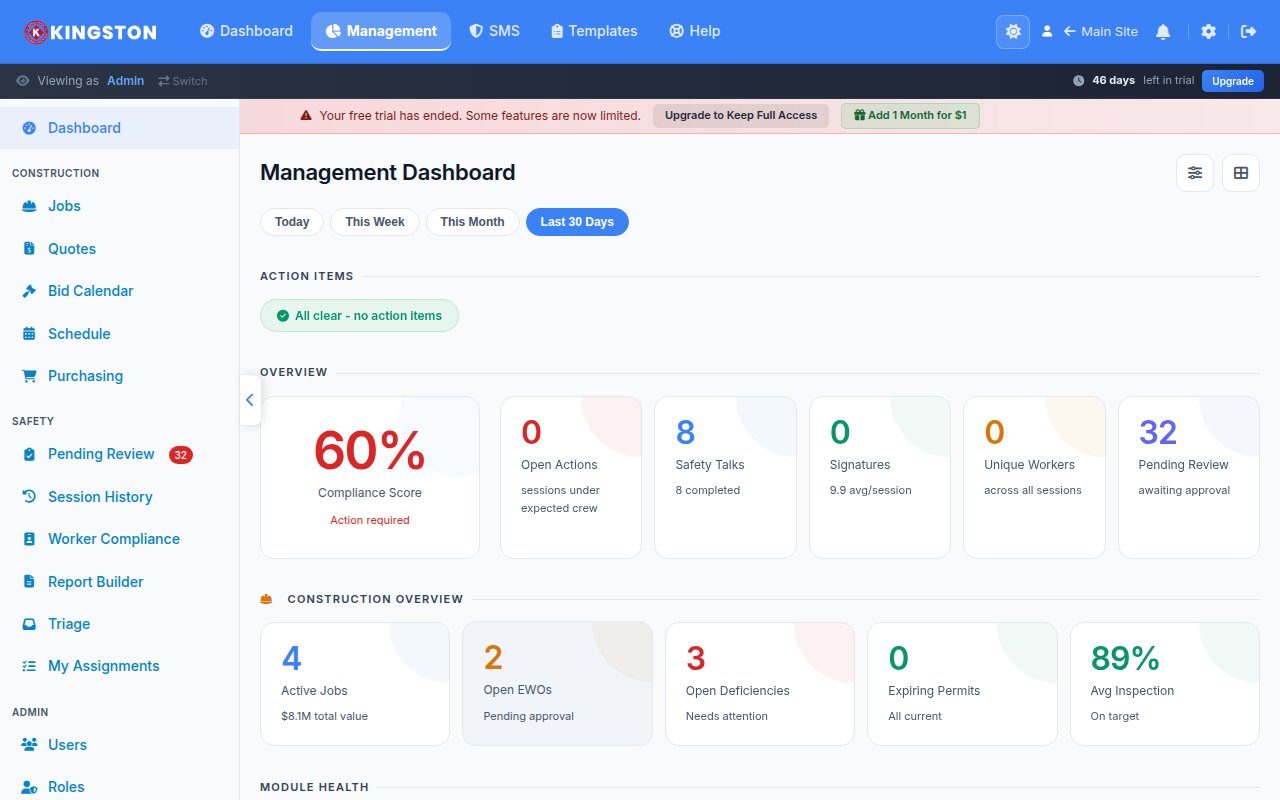
A safety KPI dashboard is a centralized visual display of the key performance indicators that measure an organization's safety performance in real time, enabling data-driven decisions that prevent injuries, reduce costs and demonstrate compliance. The most effective dashboards combine lagging indicators like TRIR and DART with leading indicators like near-miss reporting rates, training completion and inspection scores to provide a complete picture of safety health.
Too many organizations track only a handful of lagging metrics and wonder why their safety performance plateaus. This guide gives you the complete toolkit: TRIR and DART formulas with worked examples, EMR calculations, over 20 leading and 20 lagging indicators with definitions and measurement methods, dashboard design principles that drive action and frameworks for benchmarking against industry standards. Whether you are building your first safety dashboard or redesigning an existing one, this is the reference you need.
Lagging Indicators: Measuring What Already Happened
Lagging indicators measure outcomes - the incidents, injuries and illnesses that have already occurred. They are essential for regulatory compliance, benchmarking and trend analysis, but they have a critical limitation: they tell you about failures after the fact. Relying solely on lagging indicators is like driving by looking only in the rearview mirror.
Free Download: 5 Safe Work Procedures
Choose from 112 professionally written SWPs. No credit card required.
Get Free SWPsThat said, lagging indicators remain fundamental to any safety measurement program. Here are the most important ones with detailed calculation methods.
Total Recordable Incident Rate (TRIR)
TRIR measures the total number of OSHA-recordable incidents per 100 full-time equivalent employees per year. It is the most widely used safety metric in North America and is required by most prequalification systems, insurance carriers and client safety evaluations.
TRIR Formula
TRIR = (Number of OSHA Recordable Incidents x 200,000) / Total Hours Worked
The 200,000 constant represents 100 employees working 40 hours per week for 50 weeks (100 x 40 x 50 = 200,000).
TRIR Worked Example 1: Annual Calculation
Company A had 12 recordable incidents during the calendar year. Their workforce of 220 employees logged a total of 440,000 hours worked.
TRIR = (12 x 200,000) / 440,000
TRIR = 2,400,000 / 440,000
TRIR = 5.45
TRIR Worked Example 2: Quarterly Calculation
Company B wants to track TRIR quarterly. In Q1, they had 2 recordable incidents and their workforce logged 98,000 hours.
Q1 TRIR = (2 x 200,000) / 98,000
Q1 TRIR = 400,000 / 98,000
Q1 TRIR = 4.08
Note: Quarterly TRIR calculations can be volatile for smaller workforces because a single incident has an outsized impact. Rolling 12-month calculations provide a more stable trend line.
TRIR Worked Example 3: Rolling 12-Month Calculation
For a more stable trend, calculate TRIR using a rolling 12-month window that updates monthly:
| Month | Recordable Incidents (Monthly) | Hours Worked (Monthly) | Rolling 12-Month Incidents | Rolling 12-Month Hours | Rolling TRIR |
|---|---|---|---|---|---|
| January | 1 | 36,000 | 9 | 425,000 | 4.24 |
| February | 0 | 34,500 | 8 | 428,000 | 3.74 |
| March | 2 | 37,000 | 10 | 432,500 | 4.62 |
| April | 0 | 35,500 | 9 | 435,000 | 4.14 |
| May | 1 | 38,000 | 9 | 438,500 | 4.10 |
| June | 0 | 36,500 | 8 | 440,000 | 3.64 |
DART Rate (Days Away, Restricted or Transferred)
DART measures the subset of recordable incidents that resulted in the employee being away from work, placed on restricted duty or transferred to a different job. It indicates injury severity and is increasingly used by insurance carriers and prequalification systems.
DART Formula
DART Rate = (Number of DART Cases x 200,000) / Total Hours Worked
DART Worked Example
Company A (from the TRIR example) had 12 recordable incidents. Of those, 7 resulted in at least one day away from work, restricted duty or job transfer. Total hours: 440,000.
DART Rate = (7 x 200,000) / 440,000
DART Rate = 1,400,000 / 440,000
DART Rate = 3.18
Understanding the TRIR-to-DART Ratio
The ratio of DART cases to total recordables tells you about injury severity patterns:
| DART/TRIR Ratio | Interpretation | Action |
|---|---|---|
| Below 40% | Most incidents are minor (other recordable cases). Injury management and return-to-work programs are effective. | Focus on reducing total incident frequency through prevention |
| 40-60% | Typical distribution for most industries | Balanced approach to frequency and severity reduction |
| Above 60% | High proportion of serious injuries. Incidents that do occur tend to be severe. | Focus on high-consequence hazard controls and early intervention |
Lost Time Injury Rate (LTIR)
LTIR measures incidents that result in at least one full day away from work (excluding restricted duty and transfers). While less commonly used in North American prequalification than DART, it remains important internationally.
LTIR Formula
LTIR = (Number of Lost Time Cases x 200,000) / Total Hours Worked
Severity Rate
Severity rate measures the total number of days lost (away from work) per 100 full-time employees. It captures the duration of injuries, not just their frequency.
Severity Rate Formula
Severity Rate = (Total Days Away from Work x 200,000) / Total Hours Worked
Severity Rate Worked Example
Company A's 7 DART cases resulted in a combined total of 142 days away from work. Total hours: 440,000.
Severity Rate = (142 x 200,000) / 440,000
Severity Rate = 28,400,000 / 440,000
Severity Rate = 64.55
This means for every 100 full-time workers, the organization lost 64.55 days to workplace injuries during the year.
Experience Modification Rate (EMR)
EMR compares your actual workers' compensation loss experience to the expected losses for employers of similar size and industry. It directly affects your workers' compensation insurance premium.
EMR Interpretation
| EMR Range | Performance Level | Premium Impact | Typical Prequalification Status |
|---|---|---|---|
| Below 0.75 | Excellent | 25%+ discount | Exceeds all requirements |
| 0.75 - 0.90 | Good | 10-25% discount | Meets all requirements |
| 0.91 - 1.00 | Average | 0-9% discount | Meets most requirements |
| 1.01 - 1.20 | Below average | 1-20% surcharge | May fail some prequalifications |
| Above 1.20 | Poor | 20%+ surcharge | Fails most prequalifications |
How EMR Is Calculated
The EMR formula used by the National Council on Compensation Insurance (NCCI) considers three years of loss history (excluding the most recent year). The calculation splits losses into:
- Primary losses: The first portion of each claim (currently the first $5,000 to $18,500 depending on state and year), weighted heavily because frequency of claims is considered more predictive than severity
- Excess losses: Claim amounts above the primary threshold, weighted less heavily
- Expected losses: Based on your payroll by classification code and the historical loss rates for those classifications
The key insight for managing EMR is that frequency matters more than severity. Five $10,000 claims will increase your EMR more than one $50,000 claim because each claim carries the full primary loss weight.
Additional Lagging Indicators
| Indicator | Formula/Measurement | Purpose |
|---|---|---|
| Fatality Rate | (Fatalities x 200,000) / Hours Worked | Measure fatal incident frequency (critical for high-hazard industries) |
| First Aid Case Rate | (First Aid Cases x 200,000) / Hours Worked | Track minor injuries that may indicate emerging trends |
| Workers' Comp Cost per Employee | Total WC Costs / Number of Employees | Financial impact measurement |
| Average Days Away per DART Case | Total Days Away / Number of DART Cases | Injury severity and return-to-work effectiveness |
| Restricted Duty Rate | (Restricted Duty Cases x 200,000) / Hours Worked | Measure cases managed through modified duty |
| Vehicle Incident Rate | (Vehicle Incidents x 1,000,000) / Miles Driven | Fleet safety performance |
| Environmental Release Rate | Number of reportable releases per year | Track environmental compliance alongside safety |
| Citation Rate | Number of OSHA citations per inspection | Regulatory compliance effectiveness |
| Property Damage Cost | Total property/equipment damage costs per quarter | Financial losses from non-injury incidents |
| Return-to-Work Time | Average days from injury to return to full duty | Injury management and accommodation effectiveness |
Leading Indicators: Measuring What Prevents Incidents
Leading indicators measure the activities, behaviors and conditions that prevent incidents before they happen. They are the proactive side of the safety measurement equation and are far more actionable than lagging indicators because they give you the opportunity to intervene while the risk is still manageable.
The challenge with leading indicators is that they require intentional collection. Unlike recordable incidents (which are obvious and required), leading indicator data must be actively gathered through reporting systems, observation programs and management activities. For more on the distinction between these indicator types, see our guide on safety leading vs. lagging indicators.
Reporting and Participation Indicators
| Indicator | Measurement Method | Target Range | Why It Matters |
|---|---|---|---|
| Near-Miss Reporting Rate | (Near Misses Reported x 200,000) / Hours Worked | 50-100 near misses per recordable incident | High reporting rates indicate trust and healthy safety culture |
| Hazard Observation Rate | Number of hazard observations submitted per month per 100 employees | 5+ per 100 employees per month | Measures workforce engagement in proactive hazard identification |
| Safety Suggestion Rate | Number of safety improvement suggestions per quarter per 100 employees | 2+ per 100 employees per quarter | Indicates employee ownership of safety outcomes |
| Toolbox Talk Attendance Rate | Percentage of eligible workers attending scheduled toolbox talks | Above 90% | Measures reach of safety communication |
| Safety Committee Participation | Percentage of scheduled meetings held with quorum; action item completion rate | 100% meetings held; 85%+ items completed on time | Indicates committee effectiveness and organizational commitment |
| Stop-Work Authority Exercise Rate | Number of stop-work events per quarter | Trending upward initially then stable | Measures empowerment and willingness to prioritize safety over production |
Inspection and Audit Indicators
| Indicator | Measurement Method | Target Range | Why It Matters |
|---|---|---|---|
| Inspection Completion Rate | Percentage of scheduled inspections completed on time | 95%+ | Ensures systematic hazard identification is happening |
| Inspection Score Trends | Average inspection score by location over time | Trending upward | Measures improvement in physical conditions |
| Corrective Action Closure Rate | Percentage of corrective actions closed by target date | 90%+ | Measures follow-through on identified hazards |
| Average Days to Close Corrective Actions | Average calendar days from identification to verified completion | Below 14 days for high priority; below 30 days for medium | Measures responsiveness to identified risks |
| Overdue Corrective Action Count | Number of open corrective actions past their due date | Trending toward zero | Identifies systemic follow-through issues |
| Leadership Safety Walkthrough Rate | Number of documented leader walkthroughs per month | Weekly per senior leader | Measures visible leadership commitment |
Training and Competency Indicators
| Indicator | Measurement Method | Target Range | Why It Matters |
|---|---|---|---|
| Training Completion Rate | Percentage of required training completed on schedule | 98%+ | Ensures workers have the knowledge to work safely |
| Training Currency Rate | Percentage of employees with all certifications current (not expired) | 100% | Identifies compliance gaps in recertification |
| New Hire Orientation Timeliness | Percentage of new hires completing safety orientation before starting work | 100% | Prevents exposure of untrained workers to hazards |
| Competency Assessment Pass Rate | Percentage of workers passing competency evaluations on first attempt | Above 85% | Measures training effectiveness, not just completion |
| Safety Meeting Quality Score | Supervisor evaluation of toolbox talk engagement and participation | Above 4 on a 5-point scale | Measures communication quality beyond mere attendance |
Behavioral and Cultural Indicators
| Indicator | Measurement Method | Target Range | Why It Matters |
|---|---|---|---|
| Safe Behavior Observation Rate | Percentage of observed behaviors classified as "safe" in peer observation programs | Above 90% and trending upward | Directly measures behavioral compliance with safe work practices |
| Peer Observation Completion Rate | Number of observations completed vs. target | 100% of target | Measures engagement in behavioral safety programs |
| Safety Culture Survey Score | Annual or semi-annual perception survey results | Trending upward year over year | Measures underlying cultural health |
| Employee Safety Satisfaction | Survey question: "I feel safe at work" | Above 80% favorable | Measures subjective sense of safety |
| Pre-Task Planning Compliance | Percentage of jobs with documented pre-task safety plans | 100% for high-risk tasks | Measures proactive risk management at the task level |
| PPE Compliance Rate | Percentage of observations showing correct PPE use | Above 95% | Measures adherence to last-line-of-defense controls |
Management System Indicators
| Indicator | Measurement Method | Target Range | Why It Matters |
|---|---|---|---|
| Management of Change Compliance | Percentage of changes processed through formal MOC review | 100% | Prevents introduction of unassessed hazards |
| Emergency Drill Completion | Percentage of scheduled drills conducted with documented after-action review | 100% | Ensures emergency preparedness |
| Contractor Safety Prequalification Rate | Percentage of contractors meeting safety prequalification requirements before starting work | 100% | Controls contractor-related risk |
| Safety Budget Utilization | Percentage of approved safety budget spent on planned improvements | Above 90% | Measures resource allocation follow-through |
| Risk Assessment Currency | Percentage of risk assessments reviewed within their scheduled review period | 100% | Ensures risk assessments remain current |
Dashboard Design Principles
A safety KPI dashboard is only valuable if it drives decisions and actions. Too many dashboards become wallpaper - visually present but functionally ignored. The following design principles ensure your dashboard delivers actionable intelligence.
Principle 1: Audience-Specific Design
Different audiences need different dashboards. A one-size-fits-all approach dilutes relevance for everyone.
| Audience | Primary Metrics | Update Frequency | Format |
|---|---|---|---|
| Executive/Board | TRIR, DART, EMR, safety ROI, regulatory status, year-over-year trends | Monthly or quarterly | High-level summary with trend lines and benchmarks |
| Safety Director/Manager | All lagging rates, leading indicator trends, corrective action status, training compliance, audit scores | Weekly | Comprehensive dashboard with drill-down capability |
| Operations/Site Manager | Site-specific incident rates, inspection scores, open corrective actions, training status, near-miss trends | Daily to weekly | Operational dashboard focused on actionable items |
| Frontline Supervisor | Team near-miss count, inspection completion, toolbox talk schedule, open items, recognition count | Daily | Simple visual display - green/yellow/red status |
| All Employees | Incident-free days (used carefully), near-miss reporting count, recent safety improvements, recognition highlights | Real-time display | Large visual displays in common areas |
Principle 2: Balance Leading and Lagging Indicators
A dashboard dominated by lagging indicators tells you about the past but gives you no actionable intelligence about the future. Aim for a ratio of approximately 60% leading indicators to 40% lagging indicators. This balance keeps attention on proactive activities while maintaining visibility into outcomes.
Principle 3: Visual Hierarchy
The most critical information should be the most visually prominent. Use these techniques:
- Color coding. Red for metrics that need immediate attention, yellow for watch items and green for metrics on target. Avoid using more than 3-4 colors.
- Size and placement. Place the most important metrics in the top-left quadrant (where eyes naturally go first). Make critical metrics larger.
- Trend indicators. Use directional arrows or sparklines to show whether each metric is improving, stable or deteriorating.
- Benchmark lines. Include industry averages or organizational targets so viewers can instantly assess performance relative to goals.
Principle 4: Actionability
Every metric on the dashboard should answer the question: "What should I do about this?" If a metric cannot drive a specific action, it does not belong on the dashboard. For each metric, define:
- What "good" looks like (target value)
- What triggers escalation (threshold for yellow/red status)
- Who is responsible for responding when the metric goes off-target
- What specific actions are expected in response
Principle 5: Context Over Numbers
Raw numbers without context are misleading. Always present metrics with:
- Time trend. Show at least 12 months of history to reveal patterns and seasonality
- Benchmark comparison. Show industry average, best-in-class and your own target
- Rate normalization. Use rates (per 200,000 hours) rather than raw counts to enable fair comparison across sites of different sizes
- Narrative annotations. Add brief notes explaining significant changes ("New site opened March," "LOTO program launched July")
Principle 6: Freshness
Stale data kills dashboard credibility. If the data is more than a week old for operational dashboards or more than a month old for strategic dashboards, users will stop looking. Automate data collection wherever possible to ensure currency.
Industry Benchmarking
Benchmarking your safety metrics against industry averages and best-in-class performers provides essential context for evaluating your performance and setting meaningful targets.
TRIR Benchmarks by Industry Sector (2024-2025 Data)
| Industry Sector | NAICS Code Range | Average TRIR | Median TRIR | Top Quartile | Top Decile |
|---|---|---|---|---|---|
| Construction | 23 | 2.8 | 2.4 | 1.5 | 0.7 |
| Manufacturing | 31-33 | 3.2 | 2.8 | 1.8 | 0.9 |
| Transportation/Warehousing | 48-49 | 4.2 | 3.6 | 2.3 | 1.1 |
| Healthcare | 62 | 4.8 | 4.1 | 2.5 | 1.4 |
| Mining (except oil/gas) | 212 | 2.1 | 1.8 | 1.0 | 0.5 |
| Oil and Gas Extraction | 211 | 0.8 | 0.6 | 0.3 | 0.1 |
| Utilities | 22 | 2.0 | 1.7 | 1.0 | 0.5 |
| Retail Trade | 44-45 | 3.1 | 2.7 | 1.7 | 0.8 |
| Agriculture | 11 | 4.6 | 4.0 | 2.6 | 1.2 |
| Food Manufacturing | 311 | 4.3 | 3.8 | 2.2 | 1.1 |
Note: These benchmarks are based on publicly available BLS data and should be verified against the most current published statistics for your specific NAICS code.
Setting Meaningful Targets
When setting safety metric targets, avoid the common trap of targeting "zero injuries." While zero injuries is the ultimate aspiration, it is not an effective operational target because:
- It provides no intermediate milestones to measure progress
- It can inadvertently discourage reporting (people hide injuries to maintain the "zero" streak)
- It conflates effort with outcomes (a team can do everything right and still have an incident due to factors beyond their control)
Instead, set targets that are:
- Specific: "Reduce TRIR from 4.2 to 3.0" rather than "improve safety"
- Time-bound: "By December 31, 2026" rather than "soon"
- Balanced: Include leading indicator targets alongside lagging indicator targets
- Benchmarked: Compare your target against industry quartiles to ensure it is both ambitious and realistic
- Progressive: Set a 3-year trajectory with annual milestones
Reporting Safety Data to Leadership
How you present safety data to executives and board members determines whether they engage with it or gloss over it. Leadership teams are time-constrained and data-saturated. Your safety report must compete for attention with financial, operational and strategic information.
The Executive Safety Report Framework
Page 1: The Snapshot
- 3-5 headline metrics with color-coded status (TRIR, DART, EMR, top 2 leading indicators)
- Trend line for the past 12 months
- Benchmark comparison (your performance vs. industry average and target)
- One-sentence narrative: "Safety performance improved/declined/held steady this quarter because..."
Page 2: The Story
- Significant incidents with brief descriptions and learnings
- Leading indicator trends and what they predict
- Major corrective actions completed and their impact
- Regulatory updates or inspection results
Page 3: The Ask
- Resource requests with business case justification
- Decisions needed from leadership
- Strategic initiatives requiring executive sponsorship
- Risks that require board-level awareness
Translating Safety Data into Business Language
Executives respond to business impact, not safety jargon. Translate your metrics into language that resonates:
| Safety Metric | Business Translation |
|---|---|
| TRIR decreased from 4.2 to 3.1 | Incident-related costs decreased by approximately $340,000 this year |
| EMR improved from 1.12 to 0.94 | Workers' comp premium will decrease by approximately $85,000 next year |
| Near-miss reporting increased 140% | We are identifying and fixing hazards before they produce injuries, improving our risk profile |
| Training completion reached 98% | Regulatory compliance exposure reduced; audit readiness improved |
| Corrective action closure rate reached 92% | 92% of identified risks are being resolved within target timelines |
For a deeper dive into quantifying the business case for safety investment, see our guide on how to calculate safety ROI metrics.
Data-Driven Decision Making
Collecting safety data is only valuable if it informs decisions. Here is a framework for using safety metrics to drive specific actions at each organizational level.
Tactical Decisions (Daily/Weekly)
- Data source: Near-miss reports, inspection findings, observation data
- Decision examples: Assign corrective actions, adjust staffing on high-risk tasks, modify daily work plans, deploy additional resources to problem areas
- Decision maker: Supervisors and safety coordinators
Operational Decisions (Monthly/Quarterly)
- Data source: Trend analysis across leading and lagging indicators, audit results, training data
- Decision examples: Revise training programs, modify inspection frequencies, reallocate safety resources between locations, update risk assessments
- Decision maker: Safety managers and operations directors
Strategic Decisions (Quarterly/Annually)
- Data source: Year-over-year trends, benchmarking data, culture survey results, financial analysis
- Decision examples: Set annual safety targets, approve capital safety investments, adjust organizational structure, launch new programs
- Decision maker: Executive leadership and board
Common Metrics Mistakes to Avoid
Mistake 1: Celebrating Days Without Injury
Large displays counting "X days since our last recordable" create perverse incentives. Workers may hide injuries to avoid "breaking the streak" and disappointing their teammates. Celebrate reporting, prevention activities and culture improvements instead of the absence of reported events.
Mistake 2: Comparing Raw Numbers Across Sites
A site with 500 workers will naturally have more incidents than a site with 50 workers. Always normalize metrics using rates (per 200,000 hours worked) before comparing locations.
Mistake 3: Ignoring Small Numbers Statistics
For organizations with fewer than 200 employees, a single incident can swing TRIR by several points. Do not overreact to quarterly fluctuations. Use rolling 12-month calculations and focus on leading indicators that provide more statistically stable trends.
Mistake 4: Tracking Too Many Metrics
A dashboard with 50 metrics is worse than one with 10 because it overwhelms attention and dilutes focus. Select the 8-12 metrics that are most relevant to your organization's current priorities and stage of safety maturity. You can always add or swap metrics as your program evolves.
Mistake 5: Not Acting on the Data
The most sophisticated dashboard in the world is useless if nobody does anything with the information. Every metric review should end with specific action items, owners and deadlines. If a metric consistently shows the same problem without corresponding action, either fix the problem or stop tracking the metric.
Technology for Safety Dashboards
Building and maintaining an effective safety dashboard requires technology that can collect data from multiple sources, calculate metrics automatically and present information in visual, accessible formats.
Essential Technology Capabilities
- Automated data collection. Incident reports, inspection scores, training records and observation data should flow automatically into the dashboard without manual data entry or spreadsheet manipulation
- Real-time calculation. Metrics like TRIR, DART and leading indicator rates should update automatically as new data enters the system
- Multi-level views. The platform should support executive, management, site-level and supervisor views from the same data set
- Trend visualization. Clear trend lines, charts and graphs that make patterns obvious at a glance
- Drill-down capability. Users should be able to click on a metric to see the underlying data (which incidents, which locations, which time periods)
- Export and sharing. Generate reports for board meetings, client submissions and regulatory filings without rebuilding the data in a separate tool
- Mobile access. Leaders and supervisors should be able to check dashboard status from any device
Make Safety Easy's monthly review feature automatically generates the safety performance data you need for effective dashboard management. Schedule a demo to see how our platform calculates your key metrics and presents them in actionable dashboards designed for every level of your organization.
Building Your Safety Dashboard: Step-by-Step
- Define your audience. Who will use this dashboard? What decisions do they need to make?
- Select your metrics. Choose 8-12 metrics (60% leading, 40% lagging) aligned with your safety priorities.
- Establish baselines. Calculate your current performance for each metric. You cannot measure improvement without a starting point.
- Set targets. Define specific, time-bound targets for each metric based on benchmarks and your improvement trajectory.
- Design the layout. Arrange metrics by priority with the most critical information most prominent.
- Automate data collection. Connect your reporting, inspection, training and observation systems to the dashboard.
- Define response protocols. For each metric, document who is responsible and what action is expected when the metric goes off-target.
- Launch and train. Roll out the dashboard with training on how to read it and what to do with the information.
- Review and iterate. Monthly, assess whether the dashboard is driving the right behaviors and decisions. Adjust metrics, targets and design as needed.
Safety metrics are not an end in themselves. They are tools for understanding risk, driving improvement and demonstrating the value of safety investment. The best dashboard is the one that gets looked at every day, sparks conversations and drives action.
Ready to build a data-driven safety program? Explore Make Safety Easy pricing to find the right plan for your organization, or request a personalized demo to see our safety analytics platform in action.
Ready to simplify your safety program?
Make Safety Easy helps teams run toolbox talks, inspections, incident reports and more - all from one platform.
Start Your Free TrialNo credit card required. 14-day free trial.